Mathematics
Intermediate
40 mins
Teacher/Student led
+80 XP
What you need:
IWB/Projector/Large Screen
Tally frame worksheet

Posing a Question and Tallying the Data

Learn to pose a question that can be answered by collecting data, then tally in fives using gate-marks and convert your tally into a frequency table.
Teacher Class Feed

Load previous activity

    1 - Getting Started ~4 mins

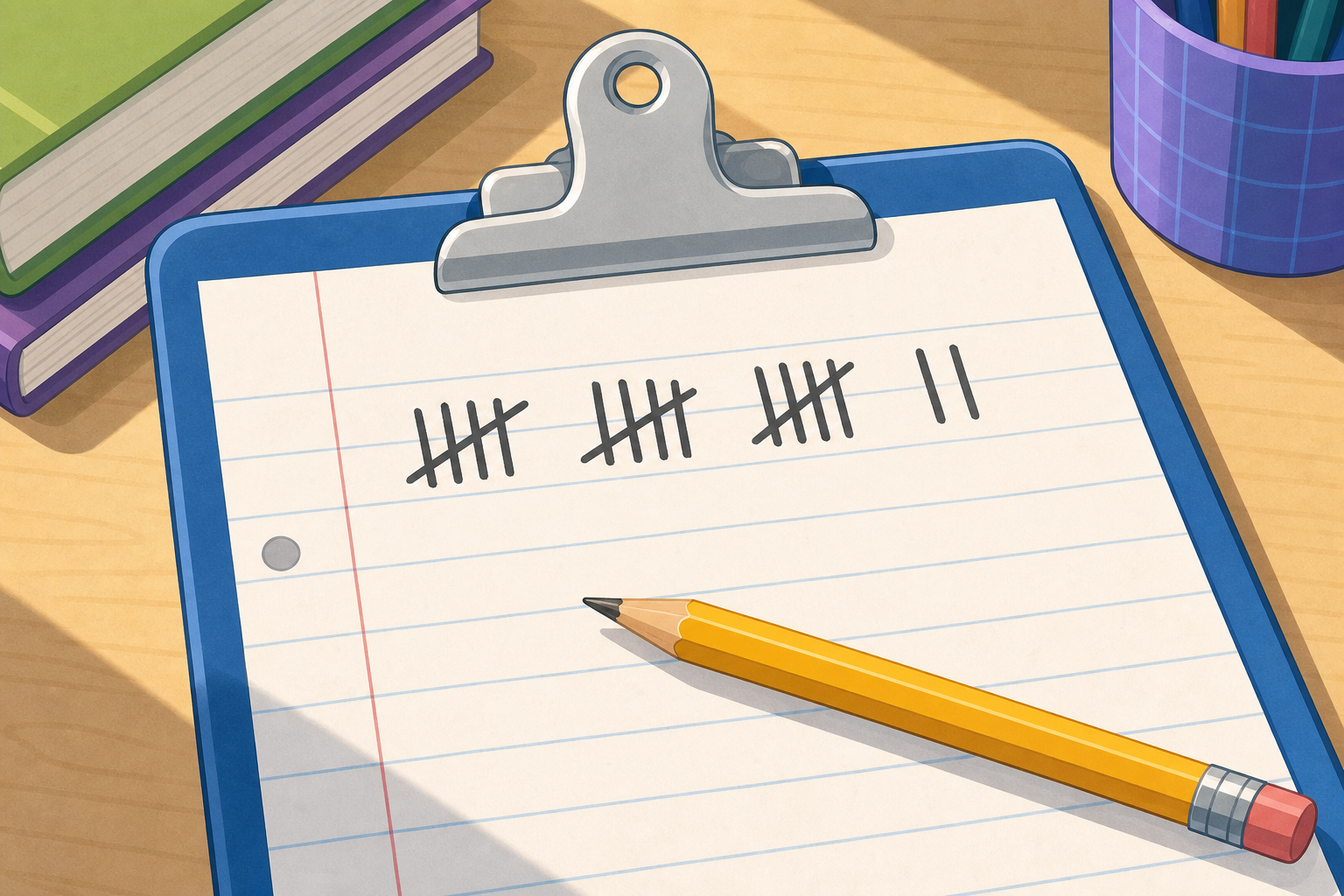
    Here is a tally someone made on a clipboard. Count the marks: three full gates of five, then two more single strokes. How many is that altogether? And here are three questions a class might want to answer: "How do we get to school?", "What is your favourite colour?", "Will it rain tomorrow?" Which of these three could we actually answer by counting?

    2 - Watch and Notice ~9 mins

    How do we get to school?

    Watch as we set up a tally for this question. The categories are Walk, Cycle, Bus and Car. Each child adds one mark to their row, and every fifth mark crosses the other four as a gate. Notice how the gates let us read the total fast.

    Reading the gates as a frequency

    Watch as the tally becomes a frequency table: Walk 12, Cycle 5, Bus 8, Car 3. The gates make 12 instantly readable as two gates plus two.

    The same data as a pictogram

    This next picture is just a sneak-peek of what our data will turn into in a later lesson. You do not need to work it out now — just notice that every child becomes one little picture.

    What is missing here?

    Here is a tally with six single strokes and no gate. Watch how much slower it is to count when nobody grouped in fives. This is why we cross every fifth mark.

    3 - Try It Together ~11 mins

    Today we draft a brand-new question together: "What is your favourite playground game?" First we name the categories — call them out and we will write a row for each. Then individual pupils come to the board to add a tally mark in turn, and the whole class watches each fifth mark cross the four before it. The frequency column on the right fills in as we go.

    What is your favourite playground game?

    4 - Build Your Question and Tally in Your Copy ~3 mins

    COPYBOOK MOMENT

    Everyone writes this one in your own maths copy — nobody comes to the board for this part. Write your own question at the top, then list its categories, one per row. Draw a tally frame with a row for each category and add gate-marks as you imagine the votes coming in. Then, in a column to the right, convert each row's tally into a frequency (the total count) for that category.

    5 - Class Challenge ~8 mins

    Today we do some real counting together. First we find a good spot to watch from — the classroom window is perfect. Then we pick a question that fits what we can see, like "What colour are the cars going by?" or "What colour jumpers are people wearing?" We tally what we see in fives for a couple of minutes, then bring our count back to the board, fill it into the tally chart, and read off the frequency for each group together.

    6 - What Did We Notice? ~3 mins

    MATHS TALK

    What makes a question one we can answer with data, and one we cannot? And why does counting in fives help us read a tally so fast?

    7 - What's Next ~2 mins

    What we did today

    • Posed a question we can answer by counting into clear categories
    • Tallied in fives, crossing every fifth mark as a gate
    • Converted each tally into a frequency in a table

    Coming up

    Coming up

    Later in this unit we take a frequency table like the ones we built today and turn it into a bar chart, so the answer to our question becomes a picture anyone can read at a glance.

    Pupil practice
    Module 7 · Data, Chance and the Co-ordinate Plane Data & Chance
    Lesson 87 · Posing a Question and Tallying the Data
    Download Activity Book page (PDF)
    End of lesson
    123learn · Online learning platform

    Unlock the full learning experience

    You're previewing this lesson. Get full access to this lesson and hundreds more — each one ready to teach, with interactive activities, printable resources and pupil progress tracking built in.

    Hundreds of curriculum-aligned lessons
    Interactive activities in every lesson
    Printable resources & progress tracking
    Copyright Notice
    This lesson is copyright of 123Learn.ie 2017 - 2025. Unauthorised use, copying or distribution is not allowed.
    🍪 Our website uses cookies to make your browsing experience better. By using our website you agree to our use of cookies. Learn more